I Built a Personal Operating System with Claude Code
How I use Claude Code and Obsidian to run my entire day. Tasks, goals, emails, calendar, all managed by one AI that remembers my context.
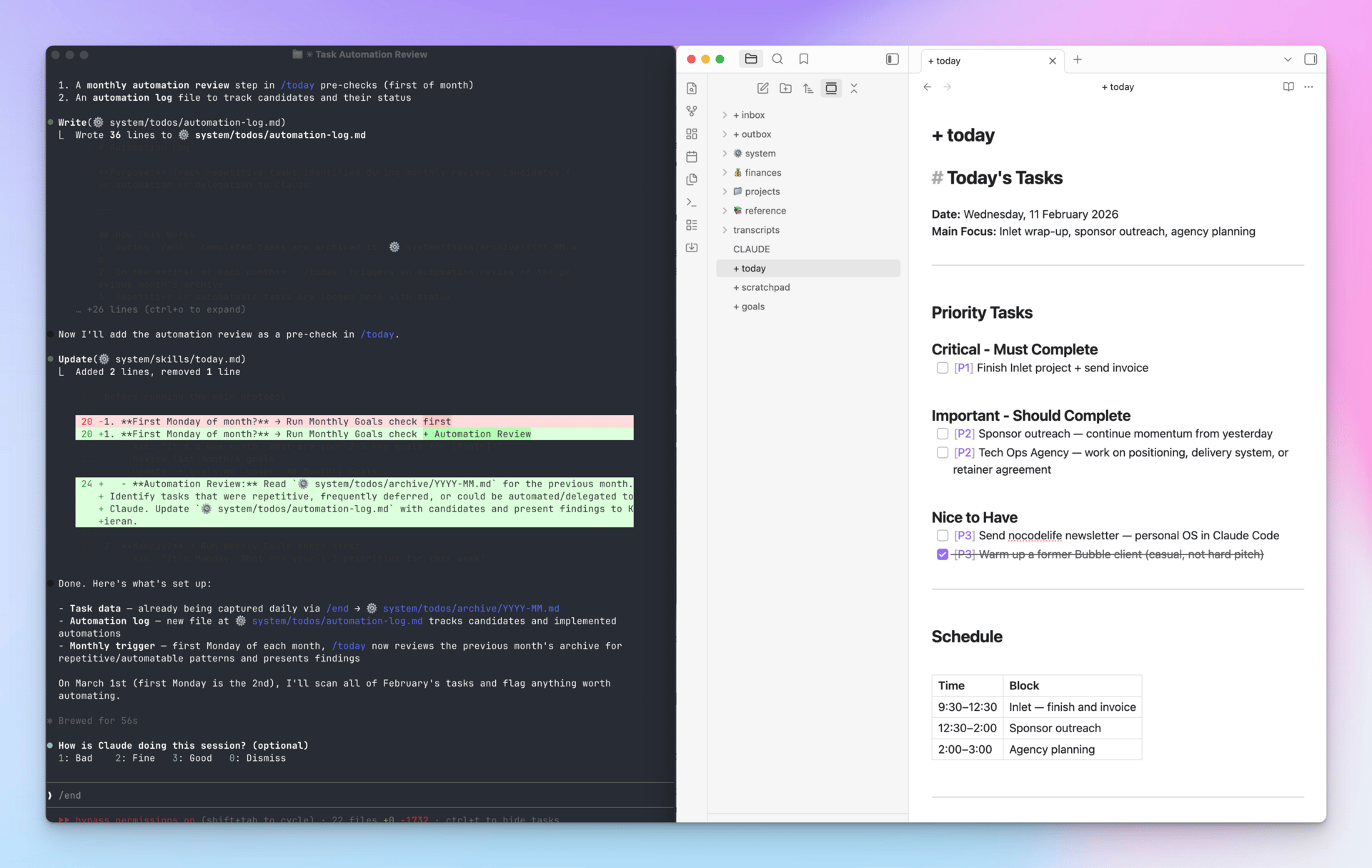
A couple of weeks ago I wrote about discovering Claude Code and building 20 projects with it.
Since then I’ve gone a bit further. I’ve built myself a personal operating system that runs my entire day.
Not an app. Not a dashboard. A system that lives inside my terminal and manages my tasks, goals, emails, calendar, and daily routine. All powered by Claude Code.
Let me explain.
The problem I’ve always had
I’ve never found a to-do list system that works for me. And my notes are a complete mess.
To-do lists start with good intentions but I add more to them than I tick off, and very quickly they become useless.
My notes are completely disorganised, just jotted down at random in Apple Notes, often while I’m on the go. Keeping them organised feels like a full-time job.
How I’ve fixed it
It started with the realisation that Claude Code can interact with files on my computer.
I exported all my Apple Notes (a closed system that’s hard to interact with) into Obsidian (just a collection of markdown files on your computer) and instantly Claude Code can manage them.
Step 1: “Hey Claude, please organise ALL my notes into categories and folders.”
5 minutes later… done.
Step 2: “Let’s build a smart system that combines my notes (knowledge base), my goals (context), and my tasks list.”
How it works
Every morning I type /today
Claude reads my goals file, checks my calendar, scans my emails across two accounts, looks at my backlog for anything I’ve been avoiding, and checks if any reminders are due.
Then it asks me one question: “What’s the number one thing to make today a win?”
Based on my answer, it builds a daily plan. It compares what I said against my weekly goals, monthly goals, and long-term priorities. If I’m about to spend a day on something that doesn’t move the needle, it tells me.
It also offers to help me on anything it knows it can do. And because it’s Claude Code, it can do a lot.
The whole thing takes about 3 minutes.
At the start of each week and each month we do a similar planning session, setting out my top goals for the period. This keeps me on target.
At the end of the day I type /end
Claude archives what I finished, moves incomplete tasks to a backlog, and flags anything I’ve deferred more than 3 times. (Turns out that’s a useful mirror for procrastination.)
I have Obsidian and Claude Code open side-by-side on one screen at all times. If the terminal interface doesn’t appeal you can also use the Claude Code desktop app or Claude Cowork.
Completely customisable, unlimited potential
I don’t just use it at the start and end of the day. It’s become my main AI copilot. I chat with it throughout the day. We brainstorm business ideas. We discuss technical issues.
Any time I think something is worth saving I ask it to save it in an appropriate place in my notes (it decides where).
If our system isn’t quite working, I ask it to change it.
For example:
- Yesterday I asked it to add a README file to every folder which contains overall context for what’s in that folder, so it knows what we’ve been discussing.
- Today I told it that in our monthly goal setting session, it should look at all the tasks I’ve completed over the past month and tell me which ones I can automate.
If I need it to do more, I ask it to code something:
- Connect to my email accounts to read/draft
- Manage my calendar
- Extract YouTube transcripts from my bookmarked videos and store them in my notes
- Gather transcripts from all my video calls, summarise and store them
- Connect to LinkedIn Sales Navigator and build me a leads list
Because it’s Claude Code it can do these things easily.
Why does this matter?
Because this is the thing nobody talks about with AI coding tools.
Everyone’s focused on “build me a SaaS in 60 minutes.” And yes, that’s impressive. But the stuff I use Claude Code for most isn’t building apps for other people. It’s running my own life more effectively.
My morning routine used to be: open email, open calendar, open Notion, open my task list, try to remember what I was doing yesterday, spend 20 minutes context-switching before I actually start working.
Now it’s: open terminal, type /today, start working.
The compound effect of that is hard to overstate. Every day feels more focused. Yes I still get distracted, but I know that I have an intelligently selected list of main tasks that align with my goals.
Claude actually holds me accountable if I keep postponing them.
And because everything is in plain text files, I own all of it. No subscription. No platform risk. Just files on my computer.
The setup isn’t complicated
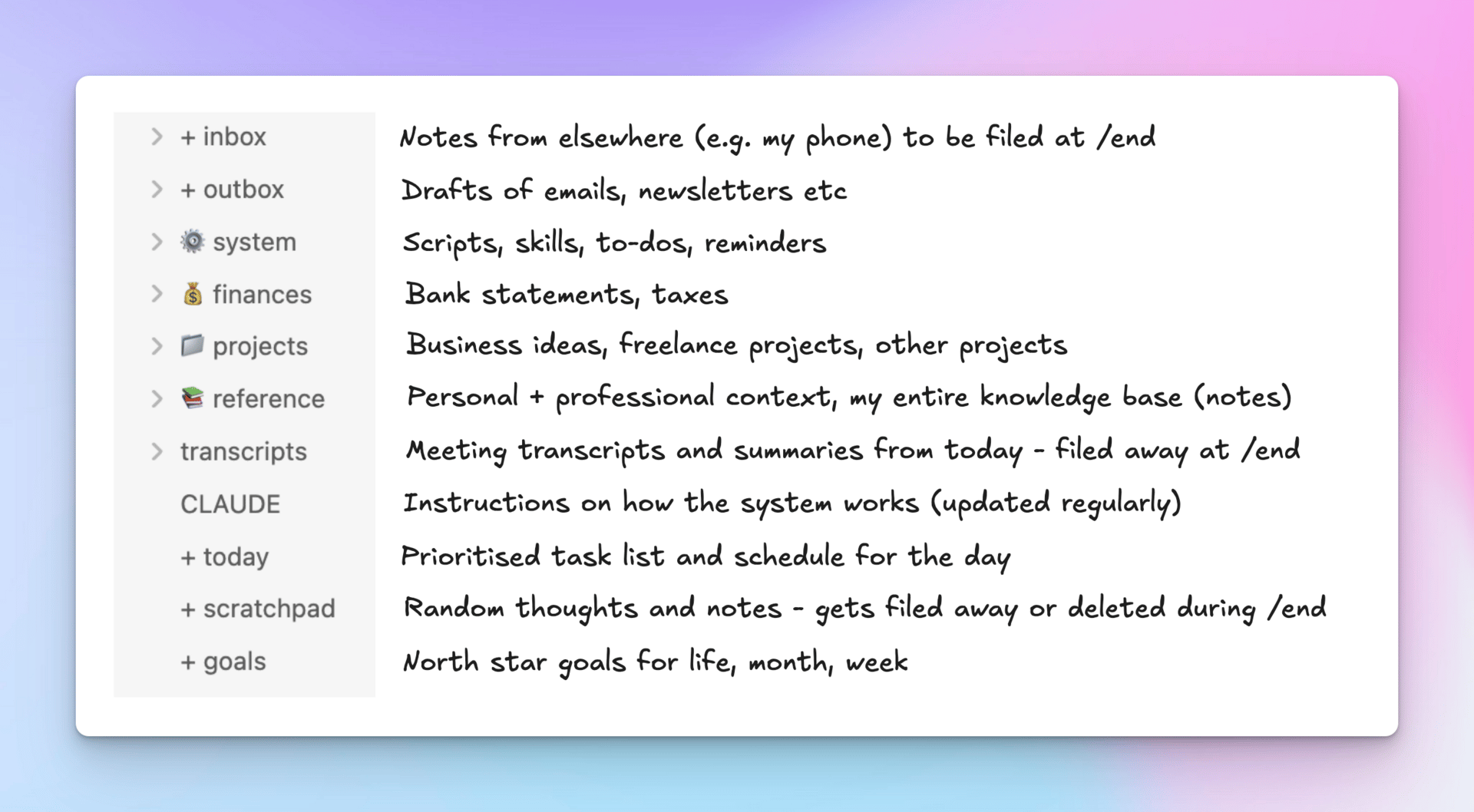
If you’re curious, here’s roughly what’s involved:
- An Obsidian vault (or any folder of markdown files)
- A CLAUDE.md file that tells Claude how your system works
- A goals file that anchors everything
- A daily task file
- A few “skill” files that define protocols like /today and /end
Claude reads the CLAUDE.md file at the start of every session. That’s where the magic happens. You’re essentially writing a manual for your AI assistant, and it follows it. And by the way, I didn’t write it. Claude wrote it and updates it whenever I think of new instructions.
What I’d tell you if you’re thinking about trying this
Start small. Don’t try to build the whole system on day one. It will evolve with you.
Start with one file: a daily task list. Get Claude Code or Claude Cowork running. Ask it to help you plan your day based on that file.
Then add a goals file. Then add a backlog. Then add email checking. Each piece is simple on its own. The power comes from having them all connected through one AI that remembers your context.
Every time you add a new feature, ask it to update the CLAUDE.md system instructions.
The best productivity system is one you actually use. And typing one word into a terminal turns out to be a very low bar.
